Gyms & Fitness Centres2026-01-23T01:42:35+00:00

Motivate Members and Boost Retention with Fitness Centre Signage

Engage and Motivate with Cloud Displays

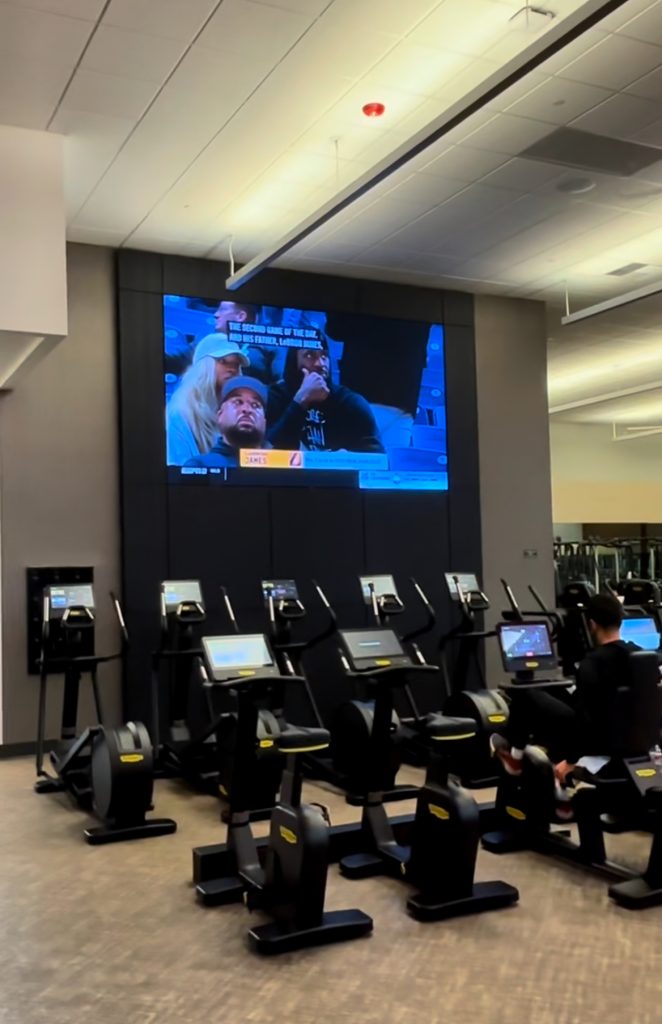
Transform your fitness environment with Cloud Displays, the digital signage software for gyms, studios, and fitness clubs. Inspire members, share updates, and promote new services — all with easy-to-manage visual content.

The Choice of Forward-Thinking Businesses

Motivated Members

Keep members energised with motivational quotes, success stories, and fitness challenges displayed across your gym. Cloud Displays turns your screens into daily sources of inspiration.

Live Schedules

Avoid confusion and missed sessions. Display live class timetables, trainer availability, and room changes, ensuring members always know what’s happening next.

Active Promotions

Promote memberships, workshops, or wellness packages directly through your screens. Cloud Displays lets you target content by time or audience to maximise engagement and conversions.

Smarter Fitness Communication

Display Key Info in Real-Time

Display workout videos, form tutorials, or nutrition advice to enrich your members’ experience and keep them learning as they train.

Interactive Timetables

Empower members with touchscreen schedules so they can check classes, trainers, or studio space availability in real time.

Digital Welcome and Check-In

Reduce front-desk queues by displaying check-in instructions, FAQs, and promotional content — keeping your staff free for personal service.

Success Stories with Cloud Displays

Make Every Screen Work Harder

Drive engagement, boost visibility, and deliver measurable impact with content that’s always fresh, timely, and on-brand. Cloud Displays gives you the tools to turn every display into a performance asset.

Smarter Digital Signage Starts with Cloud Displays

Custom Design

Our team can build the display solutions you need, keyed to your unique branding and business goals.

Use Your Files

Upload your own media, including images, videos, PDFs, or PowerPoint files. Cloud Displays seamlessly integrates with popular file systems.

Live Data

Bring your screens to life with live weather, traffic, calendars, social media feeds, and more — all managed directly from the platform.

Manage Playlists

Mix visuals, videos, and live data into automated playlists that refresh on schedule.

Smart Scheduling

Plan content by time, day, or event — so every message reaches the right audience at the right moment.

Flexible Orientation

Publish in landscape or portrait with adaptive layouts that maintain design consistency.

Dynamic Screens

Divide screens into multiple content zones for richer, more informative displays.

Offline Mode

Even if your connection drops, Cloud Displays keeps your scheduled content running smoothly.

Auto Stability Tools

Set automatic restarts or refresh intervals for continuous, reliable playback.

Browser-Based Editor

No software downloads needed — manage all content directly in your Cloud Displays portal.

Multi-User Collaboration

Invite team members with customized roles and approval workflows for smooth collaboration.

Analytics & Insights

Get real-time data on engagement, uptime, and content performance — exportable with one click.

Interactive & Kiosk Modes

Lorem Ipsum is simply dummy text of the printing and typesetting industry.

Sensors & Smart Triggers

Use AI and IoT integrations to adjust what’s shown based on time, audience, or environment.

Device Compatibility

Cloud Displays works with virtually any screen or media player, letting you focus on software flexibility — not hardware constraints.

Power your screens with Cloud Displays

Bring Engaging Digital Signage to Every Screen with Cloud Displays

Frequently Asked Questions

How can I get started with Cloud Displays?2025-11-10T23:02:54+00:00

Simply sign up for a free trial, connect your screen, and start creating. You can explore templates, upload your own media, and publish your first playlist in just minutes — no downloads or technical setup required.

Is Cloud Displays suitable for interactive kiosks?2025-11-10T23:02:54+00:00

Yes. Any screen can be turned into an interactive kiosk with touch functionality, ideal for directories, surveys, product browsing, or visitor check-ins. You can even build kiosk experiences using the drag-and-drop designer.

Can I display live data or social media feeds?2025-11-10T23:02:54+00:00

Definitely. Cloud Displays connects to over 160 apps and integrations, including live weather, traffic, calendars, social media feeds, and real-time data dashboards from tools like Power BI or Google Sheets.

Does Cloud Displays offer analytics?2025-11-10T23:02:54+00:00

Yes. The platform includes analytics and reporting tools that let you monitor uptime, screen performance, and engagement. Data can be exported for deeper analysis or integration with existing reporting systems.

What type of media can I upload?2025-11-10T23:02:54+00:00

You can upload a wide range of formats including images (JPG, PNG, GIF, BMP), videos (MP4), documents (PDF, PowerPoint), and more. Cloud Displays also integrates with popular cloud storage services for direct uploads.

Can multiple people manage the same screens?2025-11-10T23:02:54+00:00

Yes. Cloud Displays supports multi-user collaboration with custom roles, permissions, and approval workflows, making it ideal for teams managing multiple screens or locations.

Does Cloud Displays work offline?2025-11-10T23:02:54+00:00

Absolutely. Once your content is downloaded to a device, it continues running even without an internet connection. This ensures reliable playback in locations with unstable connectivity.

Can I design my own content in Cloud Displays?2025-11-10T23:02:54+00:00

Yes. The built-in visual designer allows you to create layouts using drag-and-drop tools or start from hundreds of ready-made templates. You can easily add text, images, videos, animations, or apps to your designs.

Do I need any special equipment to use Cloud Displays?2025-11-10T23:02:54+00:00

No. Cloud Displays is fully hardware-agnostic, meaning it runs on most existing screens, smart TVs, and media players. You can start displaying content instantly without costly installations.

What is Cloud Displays?2025-11-10T23:02:54+00:00

Cloud Displays is a digital signage software platform that lets you design, schedule, and manage on-screen content from anywhere. It works with almost any screen or media player, allowing you to publish messages, videos, dashboards, and interactive experiences without needing specialist hardware.

Smarter Screens, Simpler Management

Empower your business with an all-in-one signage solution that combines creativity, automation, and real-time insights. From templates to live data, Cloud Displays makes visual communication effortless.

Go to Top